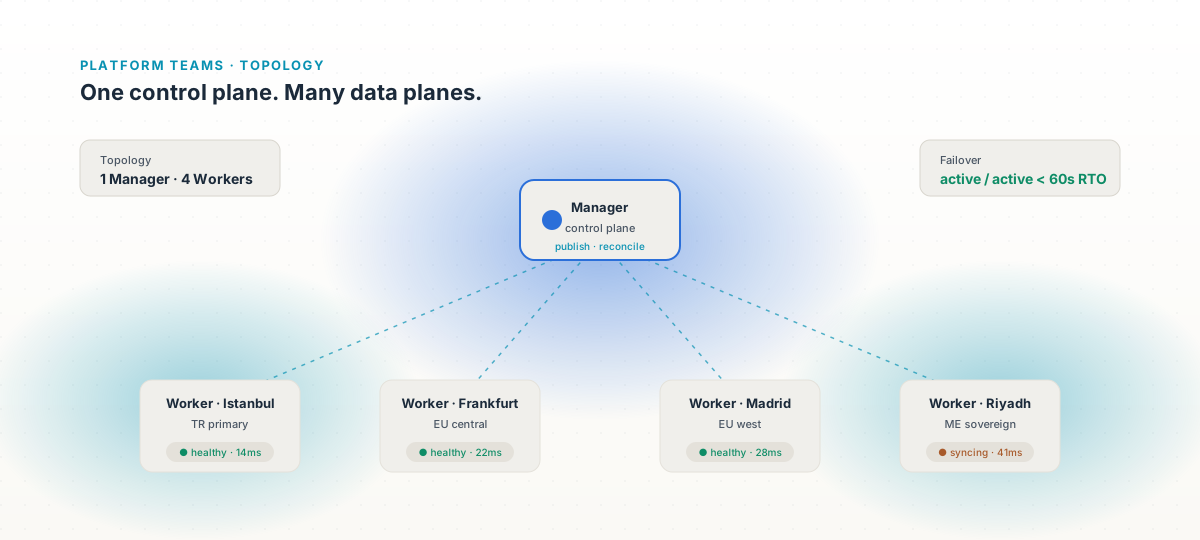
Manager / Worker split
Control plane is one Manager. Data plane is N Workers. Policies and definitions publish to every Worker; the Manager never sits in the runtime path.
Platform teams · Topology
Region, environment, edge, DR — Apinizer's Manager publishes once and every Worker cluster picks it up. Active/active or active/passive, on the Kubernetes you already run.
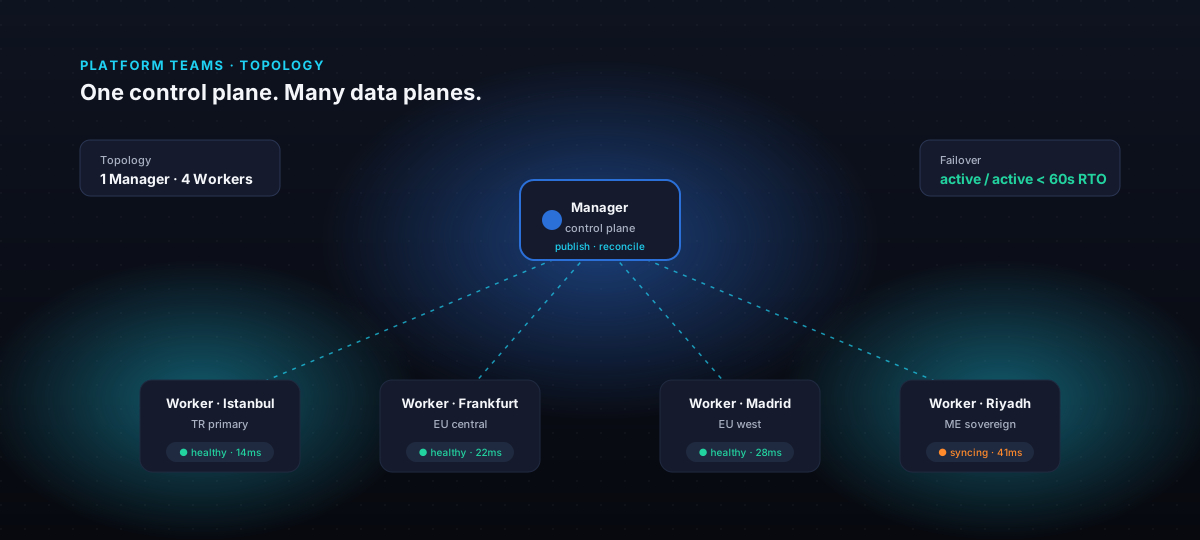
The problem
When you add a region, a DR site, or a partner edge, the gateway needs to come with you — and so does every policy, every secret, every transform. Teams improvise with a second installation, a manual export, and a prayer. Apinizer treats topology as a first-class concern: one Manager, many Workers, one published source of truth.
Capabilities
Control plane is one Manager. Data plane is N Workers. Policies and definitions publish to every Worker; the Manager never sits in the runtime path.
Pin endpoints to the cluster closest to the user — domestic, cross-border, and partner-edge — and let the Manager keep them in lockstep.
Dev, test, staging, DR — every environment is its own Worker cluster with its own secrets, variables, and policies, but the same definition source.
Workers run side-by-side. When one drops, traffic shifts; when it comes back, it resyncs from the Manager. No manual reconciliation, no drift.
Managed control plane in your central cluster; Workers anywhere — partner data centers, edge sites, even air-gapped operators with the remote deploy pattern.
APIops manifests describe the topology. Promotion is the same apply you use for code — every Worker picks it up on the next reconcile.
Use cases
Citizen-facing APIs serve from the nearest data center. The Manager in Ankara stays out of the request path; Workers reconcile every minute.
7 regions, 1 Manager
Four data centers run identical Workers. A vehicle that crosses a border doesn't notice — and neither does the SLA.
Primary Workers in Riyadh, DR Workers in Jeddah. The Manager publishes to both; a regional outage flips traffic in under a minute, with full audit continuity.
<60s RTO
Each store gets a tiny Worker on the local cluster — POS, inventory, queue. The central Manager owns the policy; stores keep serving even if WAN drops.
Customs and tracking APIs deploy to partner data centers with the remote deploy pattern. Partners never get root; the Manager pushes definitions and watches health.
12 partner regions
Both clusters carry production traffic. When Barcelona drops during a fibre cut, Madrid absorbs 100% within the gateway's heartbeat window.
Operator network and citizen network share a Manager but never share a Worker. Definitions are the same; policies and reachability are not.
Each environment is its own Worker cluster, its own namespace, its own secrets. The promotion path is reviewed in Git; nobody touches kubectl after midnight.
How it works
One control plane on the cluster of your choice — central data center, primary region, anywhere with Kubernetes.
Bring up Worker clusters in the regions and environments you need. They register with the Manager over a secure channel.
Apply a definition once. Every registered Worker picks it up on the next reconcile loop — no manual sync, no drift.
Watch health, traffic, and lag in the Manager. Promote across environments with one apply; clusters pull when ready.
Recommended products
The Worker that runs everywhere — your central cluster, regional edges, partner data centers.
Open the Gateway pagePer-cluster, per-region traffic and health — one view across every Worker.
Open the Analytics pageDistributed cache that survives Worker reschedules and stays coordinated across regions.
Open the Cache pageUptime probes from each region; alarms that escalate when a Worker falls behind.
Open the Monitoring pageResources
Manager / Worker split, environment isolation, and active/active patterns.
How the control plane and data plane fit together on Kubernetes.
Hazelcast-backed distributed cache with coordinated invalidation across Workers.
Real-time per-cluster traffic, latency, and error breakdowns.
Central control plane with remote Workers in partner data centers and edge sites.
Describe topology, environments, and promotions as code.
One control plane
A 30-minute walkthrough — Manager, Workers, promotion, and failover — on the Kubernetes you already run.